
AI can do much more than generate answers when it can connect to external tools and applications. MCP (Model Context Protocol) makes this possible by providing a standard way for AI applications to interact with tools, data, and services through MCP servers.
For WordPress users, MCP can connect AI tools with WordPress websites, allowing them to access site data, manage content, and perform other tasks through an MCP server or MCP plugin for WordPress.
But what exactly is MCP, how does it work, and how can you use it with WordPress?
In this MCP 101 guide, we’ll explain MCP, MCP servers, clients, and hosts in simple terms, along with WordPress use cases, security, setup, and common questions.
Table of Contents
What Is MCP (Model Context Protocol)?
MCP (Model Context Protocol) is an open standard that allows AI applications to connect with external tools, data sources, and services in a consistent way. Instead of building a separate integration for every AI application and tool, MCP provides a common framework for connecting them.
In simple terms, MCP acts as a bridge between AI and external systems. An AI application can use an MCP server to access information or perform actions in connected services, such as reading files, querying databases, managing business data, or working with a WordPress website.
For example, an MCP-enabled AI could connect to WordPress through an MCP server and use available tools to read posts, create content, update pages, or manage other supported WordPress data.
MCP is not an AI model itself. It is a communication and integration protocol that helps AI applications interact with external capabilities in a structured and standardized way.
Why Was MCP Created?
AI models are powerful at understanding and generating information, but they don’t automatically know how to interact with external tools, applications, or data. Before MCP, connecting an AI application to different services often required custom integrations for each tool.
MCP was created to provide a standardized way for AI applications to connect with external systems. Instead of creating separate connection methods for every AI model and service, developers can use the same protocol to expose tools, resources, and data to compatible AI clients.
For example, an MCP server can make WordPress functionality available to an AI application. The AI can then discover the available tools and use them to perform supported tasks without requiring a completely different integration for every AI client.
How Does MCP Work?
MCP works as a standardized connection between an AI application and external tools, data, or services. Instead of requiring a separate integration for every AI application and service, MCP allows them to communicate through a common protocol.

When an AI application connects to an MCP server, the server makes its available capabilities accessible to the AI. These capabilities can include tools, resources, and prompts. The AI can discover these capabilities and determine which one is needed to complete a user’s request.
The basic MCP workflow is simple:
User → AI Application → MCP Client → MCP Server → External Tool or Data → MCP Server → AI Application → User.For example, imagine you ask an AI application to find your latest WordPress post. The AI receives your request and uses its MCP client to communicate with a connected WordPress MCP server.
The MCP server calls the appropriate WordPress tool, retrieves the requested post data, and sends the result back through the MCP connection. The AI then uses that information to give you the answer.
What Problem Does MCP Solve for AI?
AI models can generate impressive responses, but their usefulness is limited when they cannot access the tools and information needed to complete real-world tasks. MCP addresses this gap by providing a standardized way for AI applications to interact with external systems.
Here are some of the main problems MCP helps solve:
- Too many separate integrations: Without a common protocol, developers may need to build and maintain different integrations between each AI application and external service. MCP provides a shared framework for these connections.
- Limited access to external data: AI models typically cannot access your files, databases, websites, or business systems on their own. MCP allows compatible applications to access approved resources through MCP servers.
- Difficulty using external tools: MCP lets servers expose specific tools that AI applications can discover and call, allowing AI to perform actions instead of only generating text.
- Inconsistent integration methods: Different services can expose their capabilities in different ways. MCP provides a standardized structure for communicating between AI clients and external systems.
- Limited AI automation: By connecting AI with tools and data, MCP enables more practical workflows, such as updating content, querying information, managing files, or interacting with a WordPress website.
- Control over AI access: MCP connections can define which tools and resources an AI application can access, giving users and developers more control over what the AI is allowed to do.
Read Also: MCP Security Best Practices
What Is an MCP Server?
An MCP server is a program or service that connects an AI application to external tools, data, and systems through the Model Context Protocol (MCP). It acts as a bridge between the AI and the outside service, making specific capabilities available to the AI in a structured way.
An MCP server can expose different tools, resources, and prompts. For example, a WordPress MCP server might provide tools for reading posts, creating pages, updating content, or accessing other supported WordPress data. The AI can discover these capabilities and request them when needed.
It is important to note that an MCP server does not have to be a physical server or a large standalone system. It can be a local program running on your computer or a remote service hosted online. What makes it an MCP server is that it implements the MCP standard and communicates with an MCP client.
How Does an MCP Server Work?
An MCP server works as a bridge between an AI application and the external system it needs to access. It uses the Model Context Protocol to expose specific tools, resources, or prompts that an AI client can discover and use.
The server handles communication with the connected system while the AI application decides when and how to use the available capabilities.
For example, if an MCP server is connected to WordPress, it can expose tools for retrieving posts, creating content, updating pages, or performing other supported actions.
When the AI needs one of these capabilities, it sends a request through the MCP client to the MCP server. The server processes the request, interacts with WordPress, and returns the result to the AI.
User → AI Application → MCP Client → MCP Server → External System → MCP Server → AI Application → UserThe process generally works like this:
- The user makes a request: The user asks the AI to perform a task.
- The AI identifies what it needs: The AI determines whether an available MCP tool can help complete the request.
- The MCP client sends the request: The AI application communicates with the appropriate MCP server through its MCP client.
- The MCP server processes the request: The server validates the request and calls the required tool or accesses the relevant resource.
- The external system performs the task: The server interacts with the connected application, database, website, or other service.
- The result returns to the AI: The MCP server sends the result back to the AI application, which uses it to respond to the user or continue the workflow.
MCP Servers vs Traditional APIs
MCP servers and traditional APIs both allow software to communicate with external systems, but they are designed for different purposes. An API typically exposes predefined endpoints that developers call directly, while an MCP server provides a standardized way for AI applications to discover and use tools, resources, and prompts.
| Feature | MCP Server | Traditional API |
|---|---|---|
| Primary purpose | Connect AI applications with tools, data, and services | Enable software-to-software communication |
| Designed for | AI applications and agents | Developers and applications |
| Communication model | Uses the Model Context Protocol | Uses protocols such as REST, GraphQL, or SOAP |
| Tool discovery | AI clients can discover available tools and capabilities | Developers typically need to know the available endpoints and documentation |
| Interaction | AI can select and call appropriate tools based on context | Application code explicitly calls specific endpoints |
| Data access | Can expose resources in a structured way | Usually accessed through API endpoints |
| AI context | Designed around AI interactions and tool use | Not specifically designed for AI |
| Integration approach | One standardized protocol can connect compatible AI clients to different MCP servers | Integration usually requires implementation specific to each API |
| Example | A WordPress MCP server exposes tools that an AI can use to manage WordPress | A WordPress REST API exposes endpoints that an application calls to manage WordPress |
What Is MCP for WordPress?
MCP for WordPress refers to using the Model Context Protocol (MCP) to connect AI applications with a WordPress website. It provides a standardized way for compatible AI tools to interact with WordPress data and functionality through an MCP server.
With an MCP connection, an AI application can access specific WordPress capabilities exposed by the server.
Depending on the available tools and permissions, this can include reading posts and pages, creating or updating content, working with media, accessing site information, or interacting with WooCommerce and other supported functionality.
For example, instead of manually opening the WordPress dashboard to find a post, you could ask a connected AI application to find it for you. The AI sends the request through the MCP client to the WordPress MCP server, which retrieves the required information and returns it to the AI.
How Does MCP Work With WordPress?
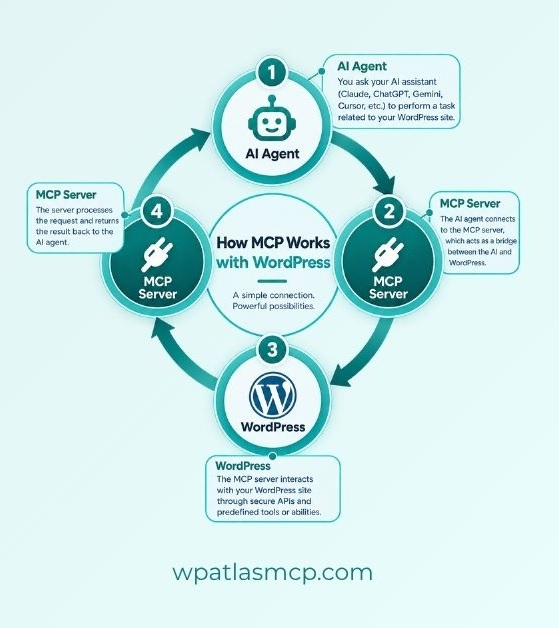
MCP connects an AI application to WordPress through an MCP server. The server acts as a bridge between the AI and your WordPress site. It exposes selected WordPress functions as tools that the AI can discover and use.
For example, you can ask an AI application to find your latest WordPress post. The AI sends the request through its MCP client. The WordPress MCP server receives the request and uses the available WordPress functionality to find the post. It then sends the result back to the AI.
The same process can support actions such as creating posts, updating pages, reading site data, or managing other supported WordPress features. What the AI can access depends on the tools, permissions, and capabilities provided by the MCP server.
User → AI Application → MCP Client → WordPress MCP Server → WordPress → MCP Server → AI → UserWhat Can MCP Do in WordPress?
MCP can give AI applications access to specific WordPress tools and data. What the AI can actually do depends on the MCP server and the permissions it has. Common use cases include:
- Create and edit posts: AI can create new posts or update existing content when write access is available.
- Manage pages: You can use AI to create, update, or retrieve WordPress pages.
- Access site content: MCP can let AI read posts, pages, categories, tags, and other supported WordPress data.
- Work with media: Depending on the available tools, AI can access or manage images and other media files.
- Manage categories and tags: AI can create, update, or retrieve taxonomies when the connected MCP server supports these actions.
- Access WordPress site information: AI can retrieve supported information about your WordPress installation, settings, or content.
- Manage WooCommerce data: A compatible MCP server can expose WooCommerce tools for tasks such as working with products, orders, or customers.
- Support SEO workflows: If the MCP server provides the required tools, AI can assist with content optimization and other SEO-related tasks.
- Automate WordPress workflows: MCP can connect AI with multiple WordPress capabilities, helping automate repetitive content and site management tasks.
WordPress MCP Adapter and the Abilities API
WordPress now has a more standardized foundation for connecting its functionality with AI through the Abilities API and the MCP Adapter. The Abilities API defines specific capabilities that WordPress core, plugins, and themes can provide. The MCP Adapter then makes those capabilities available through the Model Context Protocol. WordPress Developer Resources
What Is the WordPress Abilities API?
The WordPress Abilities API provides a standard way to register and discover individual capabilities in WordPress. An ability can represent a specific action, such as retrieving site information, updating content, or performing a diagnostic task.
Each ability can define its inputs, outputs, permissions, and execution logic. This makes the capability easier for different systems to discover and use. The Abilities API is available in WordPress 6.9 and later. WordPress Developer Resources
What Is the WordPress MCP Adapter?
The WordPress MCP Adapter is an official WordPress package that connects the Abilities API with MCP. It can expose WordPress abilities as MCP tools, resources, and prompts, allowing compatible AI clients to discover and use them. GitHub
The adapter does not provide AI itself. Instead, it provides the MCP server and transport layer. The actual capabilities come from abilities registered by WordPress core or plugins. GitHub
How Do the Abilities API and MCP Adapter Work Together?
The relationship is fairly simple:
WordPress Core / Plugins → Abilities API → MCP Adapter → MCP Server → AI ClientA WordPress component first registers an ability. The MCP Adapter can then expose that ability through MCP when it is configured for MCP access. An AI client can discover the available capability and invoke it through the MCP server. GitHub
This approach means developers can define a WordPress capability once and make it available across different contexts. The same ability can potentially be used by WordPress itself, other applications, REST-based integrations, or AI agents through MCP.
How to Choose an MCP Plugin for WordPress
Not every WordPress MCP plugin provides the same capabilities. Some focus on basic content management, while others offer more tools, integrations, and control options. Before choosing one, consider the following factors:
- AI client compatibility: Check whether the plugin supports the AI application you want to connect, such as Claude, ChatGPT, or other MCP-compatible clients.
- Available WordPress tools: Check which tasks the plugin supports, such as managing posts, pages, media, users, or WooCommerce data.
- Read and write access: Make sure you understand whether the plugin only lets AI read your site or also allows it to create and modify content.
- Security and permissions: Look for proper authentication and permission controls. AI should only have access to the WordPress data and actions it actually needs.
- WooCommerce support: If you run a WooCommerce store, check whether the plugin supports the store features you need.
- Ease of setup: A clear setup process and good documentation can make connecting WordPress to your AI client much easier.
- Maintenance and updates: Choose a plugin that is actively maintained and updated as WordPress and MCP continue to evolve.
Read Also: Best MCP Plugins for WordPress
Common MCP Problems and Troubleshooting
MCP connections can sometimes fail because of configuration, authentication, permissions, or compatibility issues. Most problems can be narrowed down by checking the connection settings and testing the MCP server separately.
MCP Server Not Connecting
- Problem: The AI client cannot connect to the MCP server.
- Troubleshooting: Check the MCP server URL, transport settings, and connection configuration. Make sure the server is running and accessible. For local servers, also check that the required application or process is running.
Authentication Errors
- Problem: The connection fails because the AI client cannot authenticate with the MCP server.
- Troubleshooting: Check your API keys, access tokens, or other authentication details. Make sure the credentials are valid and have not expired. For WordPress, also verify that the connected account has the required permissions.
MCP Tools Are Not Appearing
- Problem: The AI connects successfully, but expected tools are missing.
- Troubleshooting: Check whether the MCP server actually exposes those tools. Review the server configuration and make sure the required WordPress plugin or integration is enabled. Reconnecting the MCP client can also refresh the available tools.
Permission Errors
- Problem: The AI can connect but cannot perform certain actions.
- Troubleshooting: Check the permissions assigned to the connected user or account. Some MCP tools may require administrator-level or specific WordPress capabilities. Also check whether the server has restricted write access.
AI Cannot Modify WordPress Content
- Problem: The AI can read WordPress content but cannot create or update it.
- Troubleshooting: The MCP server may be configured as read-only. Check whether write tools are enabled and whether the connected WordPress user has permission to perform the requested action.
MCP Version or Compatibility Issues
- Problem: The MCP client and server do not work correctly together.
- Troubleshooting: Check that both sides support compatible MCP features and transport methods. Update the MCP client, server, or WordPress plugin when newer compatible versions are available. Also review the integration’s documentation for known compatibility requirements.
Common MCP Misconceptions
MCP is still a relatively new technology, so it is easy to confuse it with AI models, APIs, plugins, or automation tools. Understanding what MCP actually does can make it easier to evaluate its use cases and limitations.
- MCP Is Not an AI Model: MCP does not generate answers or think on its own. It is a protocol that helps AI applications connect with external tools and data.
- MCP Is Not a Replacement for APIs: MCP and APIs serve different purposes. An MCP server can even use an existing API to expose its functionality to AI applications.
- MCP Does Not Give AI Unlimited Access: An MCP server only exposes the tools and resources it is configured to provide. Permissions and authentication can further restrict what the AI can access or change.
- MCP Does Not Automatically Make AI More Intelligent: MCP gives AI access to additional tools and information. It does not change the underlying intelligence or reasoning capabilities of the AI model.
- MCP Is Not the Same as an MCP Server: MCP is the protocol, while an MCP server is a program or service that implements that protocol and provides specific capabilities to an AI client.
- MCP Is Not Limited to WordPress: MCP can connect AI applications with many types of external systems, including databases, files, business applications, development tools, and WordPress websites.
The Future of MCP and AI-Powered WordPress
MCP is making it easier for AI applications to work with external tools and services, and its role in WordPress is likely to grow as more capabilities become available through standardized interfaces.
Instead of using AI only to generate content or answer questions, WordPress users can increasingly use it to interact with websites and complete practical tasks.
As WordPress continues developing capabilities such as the Abilities API and MCP integrations, more WordPress functions can become accessible to compatible AI applications. This could lead to more connected workflows for content management, website maintenance, eCommerce, SEO, and other WordPress tasks.
The future of AI-powered WordPress will likely depend on how well these technologies balance automation, control, security, and user permissions.
MCP provides the connection layer, while WordPress and its plugins determine which capabilities are exposed. This gives developers and site owners more flexibility to decide how AI should interact with their websites.